AI-STEM Start (K-5)
Where creativity, curiosity, and early technology skills begin.
Introduce K-5 students to artificial intelligence through safe, age-appropriate creative activities. No prior tech experience required—for students or teachers.
-
Creative-First
AI Learning
-
Ages 5-11
Grades K-5
Early Exposure to AI & STEM Through Creative Play
AI-STEM Start introduces young learners to artificial intelligence and foundational STEM concepts using stories, visuals, and hands-on activities. Students explore safe, creative AI tools while building digital literacy, imagination, and early problem-solving skills—all through age-appropriate projects they’re excited to share with families.
- No coding required
- Complete teacher support
- Standards-aligned (ISTE)
- Family engagement included
Quick Facts
- Grades: K-5
- Duration: 8-12 weeks (flexible)
- Class size: 15-30 students (flexible)
- Format: In-school, after-school, summer, virtual
- Focus: Creativity-first AI exploration
Why AI-STEM Start Works
- For Educators
- For Parents
- For Administrators
Turnkey Curriculum That Makes You Look Great
AI-STEM Start provides complete lesson plans, visual aids, and student materials—no prep work or AI experience needed. Engage even your most reluctant learners through creative projects while meeting technology and digital literacy standards.
- Complete scripted lesson guides (perfect for substitutes too)
- Differentiates easily for diverse learners
- 2-hour professional development included
- All materials provided—just print and teach
- Built-in assessment rubrics and documentation
- Ongoing email/chat support when you need it

"I was nervous about teaching AI—I barely use technology myself! But the lesson guides were so clear and the activities so engaging that my students taught ME things. It's now my favorite unit of the year."
Screen Time That Builds Skills and Confidence
In a world where AI is everywhere, AI-STEM Start gives your child early exposure to technology in creative, age-appropriate ways. Students build confidence, digital literacy, and 21st-century skills while having fun creating art, stories, and imaginative projects.
- Safe, supervised introduction to AI tools
- Portfolio of work to share with family
- Develops critical thinking about technology
- Screen time that's educational AND creative
- Builds foundation for future STEM learning
- Take-home activities for family engagement
"My daughter came home so excited to show us the 'robot art' she created. She's talking about becoming a 'technology artist' now. I love that she sees herself as a creator, not just a consumer."
Measurable Impact With Minimal Lift
Bring cutting-edge AI education to your elementary program without overwhelming your teachers. AI-STEM Start integrates seamlessly with existing STEM, technology, or enrichment blocks while providing the structure and support your team needs.
- Standards-aligned (ISTE, state science/ELA standards)
- Professional development for all teachers included
- Positive parent engagement and community impact
- Minimal technology requirements (works with existing devices)
- Assessment tools and progress reporting built-in
- Grant funding support and documentation available
Implementation Models:
- Specials rotation (weekly STEM block)
- Classroom teacher-led (integrated with science/ELA)
- After-school enrichment
- Summer learning program
- Parent-child workshop series
Not Just Another Coding Class
AI-STEM Start takes a fundamentally different approach to technology education for young learners.
Creative-First Approach
Unlike traditional coding programs, we start with creativity and storytelling. Students see technology as a tool for imagination and self-expression, not just logic puzzles. This approach engages ALL learners, not just those who gravitate toward math.
Age-Appropriate AI Tools
We carefully curate safe, educational AI tools designed specifically for young learners. No ChatGPT or advanced platforms that aren’t developmentally appropriate. Every tool is vetted for content safety, privacy, and age-appropriate interaction.
Complete Teacher Support
Every lesson includes scripted guides, visual aids, discussion prompts, and extension activities. No tech expertise required to deliver engaging, high-quality instruction. If you can teach art or literacy, you can teach AI-STEM Start.
“The difference? Students don’t just learn ABOUT AI—they CREATE WITH AI, building confidence and skills they’ll use for life.”
Skills Students Develop
- Creative AI Exploration
- Using age-appropriate AI tools for art and storytelling
- Generating and refining creative ideas
- Expressing imagination through technology
- Understanding AI as a creative partner
- Foundational Digital Literacy
- Basic device navigation and file management
- Digital safety and responsible tool use
- Pattern recognition and logical thinking
- Early computational thinking concepts
- 21st Century Skills
- Problem-solving and iterative thinking
- Communication and presentation skills
- Collaboration and peer feedback
- Growth mindset with technology
Skills students build across the program:
- Creativity & Imagination
- Digital Citizenship Basics
- Confidence Using Technology
- Communication & Vocabulary
- Early Computational Thinking
See What Students Create
Every activity in AI-STEM Start balances creativity, learning, and fun. Here are three favorite projects that show what’s possible.
Grades K-2 2-3 sessions (30-45 min each)
Students create original characters and illustrate a simple story using AI art tools, then share their storybooks with families.
What Students Do:
- Listen to storytelling prompts about adventure characters
- Describe their character (appearance, personality, special powers)
- Use simple AI art tool to generate character images
- Select and refine their favorite versions
- Write or dictate simple sentences about their character's adventure
- Create digital storybook pages combining text and images
- Present storybooks to classmates or families
Learning Goals:
- Creative expression and narrative skills
- Descriptive vocabulary development
- Digital tool navigation
- Iterative refinement (trying different prompts)
- Understanding that AI needs clear instructions
Tools Used:
Canva AI, Adobe Express (with teacher supervision)
Teacher Support Included:
- Visual step-by-step guides for students
- Sentence starters and prompt examples
- Differentiation for emergent vs. fluent readers
- Assessment rubric
- Family extension activity
Grades 2-4 3-4 sessions
Students imagine animals adapted to future environments, generate AI images, and present scientific explanations of their creations.
What Students Do:
- Learn about animal adaptations and habitats (science connection)
- Discuss how climate change might affect future ecosystems
- Imagine a 'future animal' with special features for survival
- Write detailed descriptions of their animal's adaptations
- Generate AI images using their descriptions
- Create habitat dioramas or digital backgrounds
- Present animals and explain adaptations to class
Learning Goals:
- Scientific thinking and vocabulary
- Creative problem-solving
- AI prompt engineering basics
- Research and presentation skills
- Environmental awareness
Tools Used:
AI image generators (age-appropriate), presentation software
Teacher Support Included:
- Animal adaptation reference sheets
- Prompt writing templates
- Presentation rubric
- Extension: Create 'future zoo' class exhibit
Grades 3-5 2 sessions
Students investigate how AI 'sees' and recognizes patterns through hands-on experiments and observation.
What Students Do:
- Play image classification games (e.g., identifying objects in photos)
- Discuss: 'How do you think computers recognize pictures?'
- Test AI with different images (clear vs. blurry, complete vs. partial)
- Document observations about what AI recognizes easily vs. struggles with
- Create 'AI Challenge Cards' to test classmates
- Reflect on AI strengths and limitations
Learning Goals:
- Critical thinking about technology
- Scientific observation and documentation
- Understanding AI capabilities AND limitations
- Pattern recognition
- Early AI literacy and ethics
Tools Used:
Teachable Machine, simple image classification tools
Teacher Support Included:
- Investigation worksheet templates
- Discussion prompts about AI ethics
- Vocabulary cards (algorithm, pattern, training data)
- Extension: Design an AI tool they wish existed
Program Structure & Delivery
Every activity in AI-STEM Start balances creativity, learning, and fun. Here are three favorite projects that show what’s possible.
Program Specifications
Grade Levels
Kindergarten through 5th Grade
(Activities differentiated by reading level and complexity)
Program Duration
- Standard: 8-12 weeks
- Intensive: 6-week summer format
- Extended: Full semester or year-long
(Customizable to your schedule)
Class Size
- Ideal: 15-25 students
- Maximum: 30 students
- Small group: 8-12 students
(All formats include differentiation support)
Technology Requirements
- Tablets or computers (Chromebooks, iPads, or PCs)
- Internet connectivity
- Shared devices work fine (students don’t need 1:1)
- Optional: Projector or interactive whiteboard
Delivery Options
- In-school (integrated into STEM/tech/art blocks)
- After-school enrichment programs
- Summer camps and workshops
- Weekend family workshops
- Virtual/hybrid options available
Typical Schedule
- 1-2 sessions per week
- 30-45 minutes per session
- Flexible pacing to fit your calendar
- Built-in review and showcase sessions
What's Included
Complete Curriculum Package
- 20+ lesson plans with visual guides
- All student activity sheets and templates
- Teacher presentation slides
- Assessment rubrics and checklists
Teacher Support
- 2-hour virtual professional development
- Step-by-step implementation guide
- Pacing calendar and planning tools
- Email and chat support throughout program
Family Engagement
- Parent communication letter templates
- Take-home extension activities
- Family workshop guides (optional)
- Digital portfolio showcase tools
Standards Alignment
- ISTE Standards for Students documentation
- State science and ELA standard mapping
- Assessment and reporting tools
- Progress tracking templates
Digital Resources
- Online curriculum portal access
- Downloadable and printable materials
- Video tutorials for students and teachers
- Supplementary enrichment activities
No prior AI or coding experience required—for teachers OR students. If you can teach art, literacy, or science, you can teach AI-STEM Start.
Program Investment
AI-STEM Start programs are customized based on your specific needs, student population, and delivery format. We work with schools of all sizes and budgets to make high-quality AI education accessible.
Single Classroom
$1,500 – $3,000
Includes:
- Complete curriculum for one classroom
- Teacher PD and support
- Materials for up to 30 students
- 8-12 week implementation
Grade-Level Implementation
$3,000 – $7,000
Includes:
- Curriculum for 2-4 classrooms
- PD for multiple teachers
- Shared materials and resources
- Coordinator support
Whole-School Adoption
$7,000 – $15,000+
Includes:
- Curriculum for all elementary grades
- Comprehensive teacher training
- Implementation coaching
- Family engagement events
- Priority ongoing support
Custom pricing available for:
- District-wide implementations
- After-school programs
- Summer camp partnerships
- Multi-year commitments
Grant Funding Support Available
We provide documentation, alignment data, and proposal support for Title I, Title IV, STEM grants, and foundation funding applications.
Payment Options:
- School purchase orders accepted
- Flexible payment plans available
- Grant funding support and documentation
- Tax-deductible as educational expense
Questions about pricing? Schedule a 15-minute call to discuss your specific needs and budget.
We Set You Up for Success
You’re not just getting curriculum—you’re getting a partnership. From launch to showcase, we support your success every step of the way.
Professional Development
What’s Included:
- 2-hour live virtual training session
- Curriculum walkthrough and demo
- Classroom management tips
- Troubleshooting common challenges
- Q&A with experienced instructors
- Recorded session for reference
Optional Add-Ons:
- On-site training day
- Follow-up coaching sessions
- Refresher training for new teachers
Materials & Resources
What’s Included:
- Digital curriculum portal access
- Downloadable lesson plans and slides
- Printable student worksheets
- Video tutorials and demonstrations
- Parent communication templates
- Assessment tools and rubrics
- Student certificate templates
- Showcase event planning guide
All materials are instantly accessible online, print what you need, updated regularly with improvements, and you get lifetime access to your cohort’s materials.
Ongoing Partnership
What’s Included:
- Email support (24-48 hour response)
- Chat support during school hours
- Mid-program check-in call
- Troubleshooting assistance
- Teacher community forum access
- Monthly tips and best practices
- End-of-program debrief
- Program completion certificates
We’re Here When You Need Us:
- Technical difficulties? We’ll help.
- Lesson not working? We’ll adapt it.
- Students struggling? We’ll strategize.
- Parents asking questions? We’ve got answers.
You're Never Alone
“Every school’s first question is: ‘What if I get stuck?’ Here’s the truth: you won’t be stuck for long. Our support team responds fast, our materials are crystal clear, and our teacher community shares solutions. Hundreds of teachers have successfully taught AI-STEM Start—including many who were nervous about technology. You’ve got this, and we’ve got you.”
Hear From Teachers Like You
Don’t just take our word for it. Here’s what educators are saying about AI-STEM Start.
"I was skeptical—how could kindergarteners understand AI? But these lessons made it so accessible. My students were creating AI art and explaining to their parents how 'the computer learned from examples.' The engagement was off the charts."
Michelle Torres
Kindergarten Teacher, Riverside Elementary Portland, OR"AI-STEM Start filled a huge gap in our elementary tech curriculum. It's not coding, it's not just internet safety—it's creative, engaging, and actually prepares kids for the world they're growing up in. Plus, classroom teachers can teach it without me, which is huge."
James Chen
Technology Integration Specialist Lincoln School District, IL"I'm not a 'tech person'—I teach art! But my principal asked me to try AI-STEM Start and I'm so glad I did. The lesson guides were foolproof, and I loved watching my artistic students see technology as a creative tool. It completely changed how I think about STEM."
Sarah Johnson
Art & STEM Teacher, Washington Elementary Memphis, TN95%
of teachers report increased student engagement in technology
87%
of students show measurable improvement in digital literacy skills
Source: Kids N Tech AI Program Evaluation, 2024
What Students Achieve
By the end of AI-STEM Start, students don’t just understand AI—they CREATE with it, THINK about it critically, and SHARE their learning confidently.
By Program Completion, Students Will:
Create Original Work
- 8-10 completed AI-enhanced creative projects
- Digital portfolio to share with families
- Confidence presenting their work
Understand Core Concepts
- How AI learns from examples
- Difference between AI and human creativity
- When AI is helpful and when it’s not
- Basic prompt engineering skills
Use Technology Responsibly
- Navigate age-appropriate AI tools safely
- Understand digital citizenship basics
- Make thoughtful choices about tool use
- Protect privacy and personal information
Communicate Learning
- Explain AI concepts in their own words
- Share creative work and process
- Give and receive constructive feedback
- Demonstrate growth mindset
Build Foundation Skills
- Early computational thinking
- Pattern recognition and prediction
- Iterative problem-solving
- Creative confidence with technology
How We Measure Success
Pre/Post Assessments:
- Digital literacy skills survey
- AI knowledge questionnaire (age-appropriate)
- Technology confidence self-assessment
Ongoing Documentation:
- Project completion tracking
- Participation and engagement rubrics
- Skill development checklists
- Portfolio of student work
Teacher Reporting Tools:
- Progress dashboard templates
- Parent communication samples
- Standards alignment documentation
- End-of-program summary reports
What You Can Share With Parents:
- Individual student portfolios
- Skill development progress
- Photos/videos of student work
- Certificate of completion
What You Can Share With Administrators:
- Participation and completion rates
- Pre/post assessment data
- Standards met and skills developed
- Parent engagement metrics
- Student and teacher satisfaction surveys
Every student completes the program with a digital portfolio of creative work—perfect for parent conferences, school showcases, or just celebrating growth!
Common Questions About AI-STEM Start
We’ve answered the questions we hear most from teachers, principals, and parents. Don’t see yours? Contact us anytime.
Do teachers need AI or coding experience to teach this program?
Absolutely not! AI-STEM Start is designed specifically for elementary teachers with NO technology background. Our complete lesson guides include:
- Scripted teacher talk and discussion prompts
- Step-by-step visual instructions
- Troubleshooting tips for common issues
- Video demonstrations of activities
- Background information on AI concepts (in simple language)
Many of our most successful teachers describe themselves as "not tech people." If you can teach art, literacy, or science, you can teach AI-STEM Start. Plus, our 2-hour professional development and ongoing support mean you're never figuring things out alone.
What technology and devices do we need?
Minimal technology is required:
- Tablets or computers (Chromebooks, iPads, PCs—any will work)
- Internet connectivity
- Basic web browser
**Optional but Helpful:**
- Projector or interactive whiteboard for demonstrations
- Headphones for individual work (if available)
**Good News:**
- Students don't need 1:1 devices—shared devices work great
- Most activities work on ANY device type
- No special software to install
- No expensive equipment needed
We'll assess your specific technology setup during planning and adapt activities if needed.
How long are the lessons? How does this fit into our schedule?
AI-STEM Start is designed for maximum flexibility:
**Lesson Duration:**
- Standard lessons: 30-45 minutes
- Perfect for specials rotation, STEM blocks, or enrichment periods
- Can be extended to 60 minutes with enrichment activities
- Can be condensed to 20-25 minutes for younger grades
**Scheduling Options:**
- Once per week for 12 weeks
- Twice per week for 6-8 weeks
- Daily during summer camp (2-3 weeks intensive)
- Integrated into existing science/ELA units
We provide pacing calendars for different schedule types and help you customize to your specific calendar.
Is this curriculum aligned to educational standards?
Yes! AI-STEM Start aligns with multiple standards frameworks:
**ISTE Standards for Students:**
- Empowered Learner (1a, 1b, 1c, 1d)
- Digital Citizen (2b, 2c, 2d)
- Knowledge Constructor (3a, 3b, 3d)
- Innovative Designer (4a, 4b, 4c, 4d)
- Computational Thinker (5a, 5b, 5c, 5d)
- Creative Communicator (6a, 6b, 6c, 6d)
**Cross-Curricular Connections:**
- Science: Scientific inquiry, observation, life/earth science concepts
- ELA: Descriptive writing, vocabulary development, presentation skills
- Arts: Creative expression, design thinking, visual literacy
- Social Studies: Ethics, digital citizenship, community impact
All alignment documentation is included with curriculum materials.
Can we customize the program for our school's specific needs?
Absolutely! While the core curriculum is structured, we offer extensive customization:
**What Can Be Customized:**
- Program duration (6 weeks to full year)
- Pacing (intensive vs. extended)
- Grade-level focus (just K-2, just 3-5, or full K-5)
- Integration with your existing themes or units
- Language and cultural adaptations
- Delivery format (in-school, after-school, hybrid)
**Examples of Customization:**
- A school in Texas integrated AI-STEM Start with their Texas history unit
- A Title I school focused extra on family engagement components
- A STEM magnet school extended the program to a full semester with advanced projects
- An after-school program condensed to 6-week summer camp format
We'll discuss your specific goals during our planning conversation and adapt accordingly.
What if students have never used AI tools or technology before?
That's perfectly fine—in fact, that's our target audience!
**AI-STEM Start Assumes:**
- ZERO prior AI experience (for students AND teachers)
- Minimal computer/tablet experience
- Wide range of digital literacy levels in the same class
**How We Scaffold Learning:**
- Week 1-2: Basic device navigation and digital citizenship
- Week 3-4: Introduction to first simple AI tool with heavy guidance
- Week 5-8: Gradual independence with scaffolded support
- Week 9-12: Student-led exploration and creative projects
**Differentiation Included:**
- Simplified instructions for emergent readers
- Visual step-by-step guides for all students
- Peer support strategies
- Extension activities for advanced learners
- Accommodation suggestions for diverse learners
Students who start with zero tech experience end the program confidently creating AI-enhanced projects!
Are the AI tools safe for young children? What about privacy?
Student safety and privacy are our top priorities.
**How We Ensure Safety:**
**Vetted Tools Only:**
- Every AI tool is reviewed for age-appropriateness
- Content filters and safety features enabled
- No tools that collect student personal information
- Comply with COPPA (Children's Online Privacy Protection Act)
- No student accounts or logins required for most activities
**Teacher Supervision:**
- All AI tool use happens in supervised classroom settings
- Teacher demonstrates and monitors all activities
- Students never use tools independently without training
- Parent permission templates included
**Privacy Protection:**
- Students don't share personal information with AI tools
- No student data collection by third-party tools
- Activities designed to protect student identity
- Family communication about tools and privacy included
We provide detailed parent communication letters explaining exactly which tools are used and how student safety is protected.
How do we get started? What's the implementation timeline?
Getting started is straightforward! Here's our typical process:
**Step 1: Initial Conversation (Week 1)**
- 20-30 minute call to discuss your needs
- Review grade levels, schedule, and goals
- Assess technology setup
- Answer your questions
**Step 2: Proposal & Planning (Week 2)**
- Receive custom proposal with pricing
- Review curriculum materials and sample lessons
- Discuss timeline and customization
- Get approval from decision-makers
**Step 3: Onboarding & PD (Week 3-4)**
- Curriculum materials delivered (digital access)
- Professional development scheduled
- Teacher training completed
- Materials prepared for launch
**Step 4: Program Launch (Week 4-6)**
- First lessons begin!
- Ongoing support available • Mid-program check-in scheduled
**Total Timeline:**
From first conversation to program launch: 4-6 weeks typically. Rush implementation possible for summer programs.
What kind of family engagement is included?
Family engagement is built into AI-STEM Start because learning is more powerful when families are involved.
**What's Included:**
**Parent Communication:**
- Welcome letter templates (customizable)
- Program overview for families
- "What We're Learning" updates
- FAQ for parent questions
- Information about AI tools and safety
**Take-Home Activities:**
- Family extension projects for each unit
- "Try This at Home" challenges
- Simple activities that don't require special technology
- Conversation starters about AI and technology
**Showcase Opportunities:**
- End-of-program student presentation guides
- Portfolio sharing templates
- Family showcase event planning resources
- Digital portfolio platforms for sharing
Teachers report that parents LOVE seeing their students' creative AI projects and often ask great questions about the technology being used.
What does program success look like? How do we know it's working?
Success is measured in multiple ways, and we provide the tools to track and document impact.
**Immediate Indicators:**
- High student engagement and excitement
- Students asking to continue working on projects
- Creative, original work being produced
- Students explaining AI concepts in their own words
- Positive feedback from families
**Measurable Outcomes:**
- Pre/post digital literacy assessments show growth
- Portfolio of 8-10 completed projects per student
- Skill development checklist progress
- Attendance and participation rates
- Student confidence surveys
**Teacher Feedback:**
- 95% of teachers report increased student engagement
- 90% successfully implement without prior tech experience
- 87% continue with advanced programs the following year
We provide assessment tools, data collection templates, and reporting frameworks so you can demonstrate impact to stakeholders.
Didn’t find your answer? We’re here to help.
Ready for the Next Level?
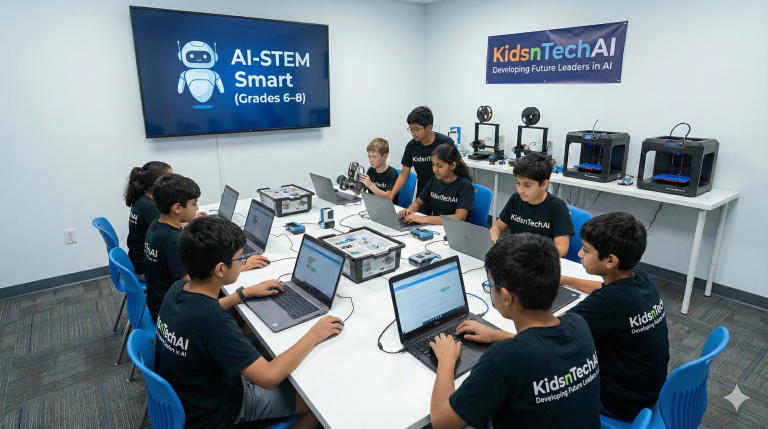
Students who complete AI-STEM Start are perfectly prepared for AI-STEM Smart (grades 6-8), where they’ll dive deeper into prompt engineering, AI ethics, and more complex creative projects.
What's Next:
- Deeper exploration of how AI works
- Prompt engineering for better results
- Digital citizenship and AI ethics
- Collaborative projects and challenges
- Introduction to responsible AI use
Building a K-12 AI pathway? Ask us about progressive curriculum planning.
Take the Next Step
Choose the option that fits where you are in your decision process. We’re here to support you however we can help.
Download Free Sample Activities
Get 3 complete lesson plans, teacher guides, and student worksheets to see exactly what AI-STEM Start looks like in action. Perfect for sharing with your team or trying in your classroom.
What You’ll Get:
- 3 ready-to-use activities
- Implementation tips
- Program overview
- Pricing information
Schedule a Consultation
Book a 20-minute call to discuss your school’s specific needs, explore customization options, and get a custom proposal. No pressure, just information.
What You’ll Get:
- Your goals and timeline
- Grade levels and student population
- Technology setup
- Pricing and funding options
Attend a Virtual Demo
Join a live virtual demo session where we walk through actual lessons, demonstrate AI tools, and answer all your questions. See AI-STEM Start in action!
What You’ll Get:
- Monthly sessions (30-45 minutes)
- Q&A with instructors
- See sample student work
- Meet other educators
Bring AI-STEM Start to Your Classroom
Join 50+ elementary programs nationwide that are empowering K-5 students with creative, age-appropriate AI education. Whether you’re a teacher exploring options, a principal planning for next year, or a parent advocating for your school—we’re ready to help you bring AI-STEM Start to your students.
Students Served
years of youth tech education
trusted by educators nationwide
Awards & Recognition
- AARP Purpose Prize Winner
- PBS American Graduate Award
Recognized for innovation in youth technology education
Security & Compliance
- COPPA Compliant
- Student Privacy Pledge
Committed to student safety, privacy, and equitable access